TNVS Guide 101
Ang pinaka-comperehensive na step-by-step guide sa pagkuha ng CPC.
GRAB TNVS
Para magsimula, piliin kung saang location mo nais mapabilang sa GrabCar:

TNVS Accreditation
Metro Manila Process
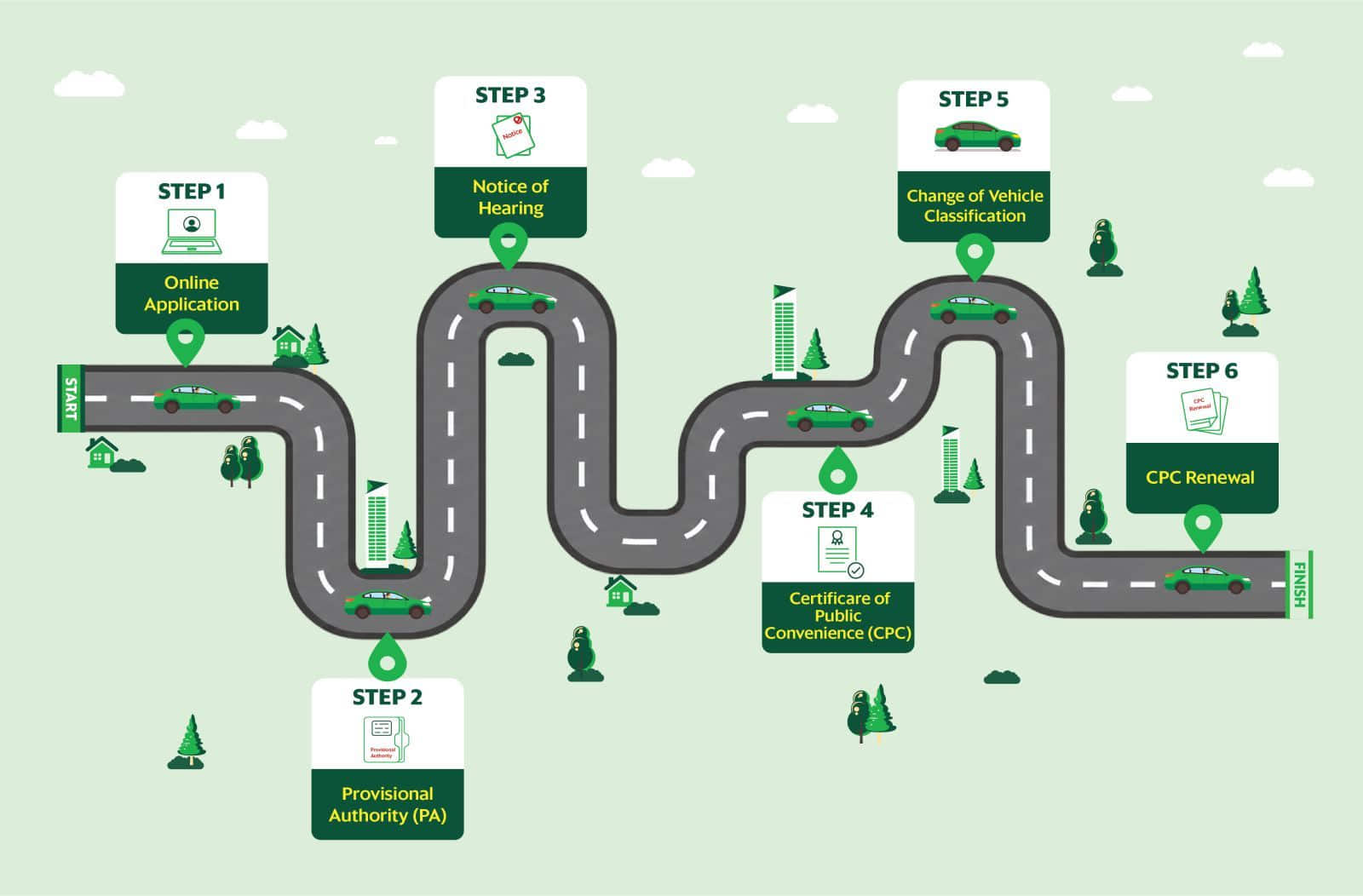
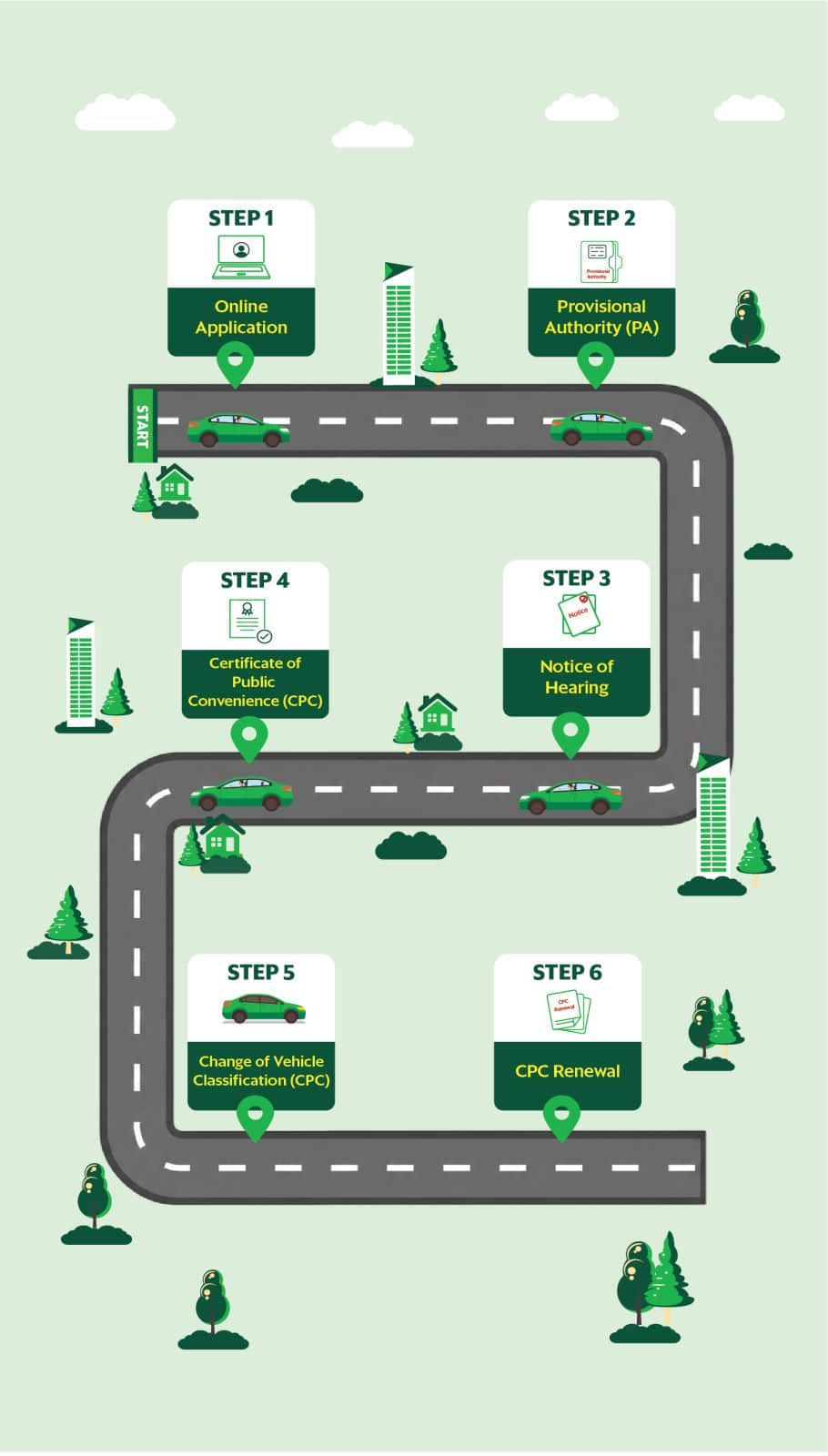
Updated as of May 2026. May be subject to change based on LTFRB instructions.

STEP 1
Gumawa ng Account at Application Online
Ang mga sumusunod na steps ay base sa bagong LTFRB MC 2026-008 na kung saan ang mga TNVS applicants ay maaari ng makapag apply ng prangkisa through online Application.
Importanteng Tandaan:
- Ang vehicle year model na tinatanggap sa bagong aplikasyon ay hindi dapat lalagpas sa tatlong taong edad ng sasakyan upon application. Ngayong 2026, ang mga tinatanggap na Vehicle year model ay 2023 pataas.
- Ang iyong ID at ang ibang dokumentong kailangan i-upload sa portal ay dapat naka PDF file format.
- Maiging i-double check ang lahat ng impormasyon na iyong ilalagay upang hindi maging dahilan ng delay or rejection sa iyong TNVS Application.
- Ang Grab ay nagbibigay ng assistance para sa mga aplikanteng nais magpatulong sa pag gawa at pag submit ng iyong TNVS application online. Pumunta lamang sa Grab Greenfield District Pavillion, Sto., Cristo Street Greenfield, Mandaluyong City from 9am to 5pm.
- Disclaimer: Ang tulong o assistance ng Grab ay hindi nangangahulugang may slots na.
- Pindutin ang “Create Account” button upang makapag register.
- Ilagay ang mga hinihinging information tulad ng iyong pangalan at email address.
- I-click ang verification button o link na ipapadala ng LTFRB sa iyong registered email address upang makapag patuloy sa pag register ng iyong account.
- I-upload ang scanned copy ng iyong Valid Government ID (harap at likod) at i-submit.
- Sa “New Application” section, ilagay ang iyong vehicle information.
- I-upload ang vehicle Official Receipt/Certificate of Registration (OR/CR) o Sales Invoice and Delivery Receipt.
- Siguraduhing tama ang mga detalye bago i-submit ang iyong application.
- Upon successful submission ng iyong application, ang system ay mag ge-generate ng case number na magsisilbing Official Control Number o Tracking Identifier ng iyong application.
- Ang iyong application na isinumite ay subject for evaluation and approval ng LTFRB. Maaari mong i-verify ang resulta ng evaluation sa iyong registered Email address at sa iyong portal account.
-Ipapadala ito ng LTFRB within 3 to 5 working days. - Sa pag-apruba ng LTFRB ng iyong application, ikaw ay required na kumuha ng Personal Passenger Accident Insurance Policy (PPAI) para sa iyong registered unit at i-upload ito sa iyong portal account sa loob ng 5 working days. Tandaan na maaaring makansela ang iyong application kung hindi mo ito nagawa.
- Pagkatapos mo mai-submit at ma-verify ang iyong uploaded Personal Passenger Accident Insurance (PPAI), kailangan mo bayaran ang application fee sa loob ng 5 days.
- Maaari mo itong bayaran through online, o personal na magbayad sa LTFRB’s cashier.
- Kung personal ka’ng magbabayad, kailangan mo’ng dalhin ang screenshot ng iyong payment order na makikita sa iyong portal account.
STEP 2
I-download ang iyong provisinal Authority (PA) sa iyong LTFRB Portal Account at magpa-onbard sa Grab
- Pagkatapos ng successful payment para sa iyong TNVS application, ang LTFRB Legal Division ay mag-upload ng Provisional Authority (PA) sa iyong Portal account.
- Maaari mo itong mai-download at mag pa onboard sa Grab Office.
- I-declare sa iyong portal account ang Grab bilang iyong napiling Transport Network Company (TNC).
- Tandaan na maaaring makansela ang iyong Provisional Authority kung mabigo kang pumili ng TNC sa loob ng 30 days.
Lahat ng requirements at Application Form ay kailangan ilagay sa LONG ORANGE FOLDER:
- 4 copies x Notarized Verified Application Form (Download, fill-up and print the form here)
- 1 photocopy x Proof of Filipino Citizenship (alin man sa sumusunod):
- Authenticated Birth Certificate from Philippine Statistics Authority
- Valid Philippine Passport
- Voter’s I.D.
- Marriage Certificate
- Original and 1 photocopy x LTO Official Receipt (OR) and Certificate of Registration (CR) of authorized unit/s
- Ang OR ay dapat naka-pangalan sa TNVS applicant o vehicle owner.
- Siguraduhin na kita ang year model sa OR/CR (Tatanggapin lang ang vehicle with year model 2020-2023)
- Kung hindi pa vailable ang ORCR ng sasakyan, maaaring dalhin ang Sales Invoice with Delivery Receipt. Ito’y para lamang sa mga unit na bagong release (<3 Months).
- For newly-released cars (less than 3 months old): if a copy of the ORCR is not yet available, you may submit a Sales Invoice with Delivery Receipt.
- Passenger Insurance (i.e. PAMI or SCCI) | How to get PAMI?
Ihanda ang bayad para sa passenger insurance (see table below). Si Grab na ang bibili ng inyong Passenger Insurance as part of the filing process
| Passenger Insurance Fee (from SSCI): | Fee |
| Sedan | ₱2,369.00 |
| SUV/Premium | ₱3,139.00 |
MAHALAGANG PAALALA:
- Requirements above should be under the name of the TNVS Applicant (Vehicle Owner).
- In case the TNVS Applicant cannot appear in person, only PARENTS, SPOUSE and CHILDREN can act as representatives. Please bring the following:
- Notarized Special Power of Attorney signed by applicant
- SPA must indicate that the application is for LTFRB/LTO purposes.
- Please bring a photocopy of the representative’s valid ID.
LTFRB Processing Fee | For one unit | Additional cost per unit |
Filing fee (first 2 units) | ₱ 510.00 | ₱ 70.00 |
Legal Research Fee | ₱ 10.00 | |
Provisional Authority Fee | ₱ 250.00 | |
Passenger Insurance Fee (from SCCI): | Cost per unit | |
Sedan | ₱ 2639.00 | |
SUV/Premium | ₱ 3139.00 | |
Legal Assistance Fees | Per Case Number (starting Jan 9, 2023) | One -Time Notary Fee |
PA Filing Legal Assistance Fee (to be paid to Grab upon submission of PA requirements) | ₱ 3,000.00 | ₱ 500.00 |
CPC Hearing Legal Assistance Fee (to be paid to lawyer upon submission of FOE requirements) | ₱ 3,000.00 |
Once makuha na namin ang inyong PA mula sa LTFRB, makakatanggap kayo muli ng isa pang SMS with instructions on how to claim your PA sa Grab office.
PAALALA: Maaaring umabot ng estimated 2 to 3 months para i-release ng LTFRB ang inyong PA. Kung wala pa kayong natatanggap na SMS mula sa Grab, hindi pa available ang inyong PA for pick-up.
STEP 2.1. Mag renew ng Provisional Authority
- Maaaring asikasuhin ang pag-renew ng iyong PA bago pa man ito mapaso, o habang hinihintay ang paglabas ng iyong Certificate of Public Convenience (CPC).
Ang Provisional Authority (PA) ay mayroon ng bisa o validity na anim (6) na buwan. Ito ay ayon sa LTFRB MC 2026-017.
Tandaan: Ang maaari lamang makapag renew ng PA ay ang mga Submitted For Resolution ang CPC Application. Ibig sabihin nito ay successful ang iyong CPC hearing. (Source: LTFRB BR 185-2022)
- Ayon sa LTFRB Board Resolution 185 – simula January 9, 2023 lahat lamang ng applications na may CPC status of “Submitted for Resolution” ang maaring mag apply ng PA Renewal.
- Once “Submitted for Resolution” na ang inyong CPC status, sundan ang step-by-step process for PA Renewal: https://www.grab.com/ph/blog/how-to-renew-pa-via-online-filing/
- Kung nag-expire na ang iyong PA (90 days validity), at hindi pa submitted for resolution ang inyong CPC application, maaari naming i-deactivate ang iyong Grab account.
Kung dismissed na ang iyong case number, kelangan munang kumuha ng panibagong Notice of Hearing bago mag-request ng extension of PA.
Basta may PA, pwede na ma-onboard, Ka-Grab!
Ayon ito sa bagong patakaran na inilabas ni LTFRB, simula January 9,2023, lahat ng bagong applications sa Grab ay kailangan may P.A at PAMI (Passenger Insurance Policy) bago ma-activate sa platform
Pagkakuha ng Case Number at Provisional Authority, pumunta sa pinaka-malapit na Grab Driver Center para ma-activate! ONE DAY Activation 'to Ka-Grab! Alamin ang mga Onboarding Requirements dito.

STEP 3
Isubmit ang formal Offer of Evidence
(FOE) at umattend sa iyong CPC Hearing
Alinsunod sa LTFRB MC 2026-008, ang itinakdang petsa ng inyong Hearing ay (15) days matapos ilabas ang kaukulang abiso o Notice of Hearing.
Maaari mong matanggap ang Notice of Hearing sa iyong account sa https://ltfrb-foa.ph/ o sa iyong registered email address.
- I-download ang Notice of Hearing at i-print out.
- Required na i-upload ang iyong CPC requirements sa iyong LTFRB Portal Account 5 days before ng iyong hearing date.
Hearing Session Guidelines for January 2023 slots
- According to Board Resolution No. 065 Series of 2022 , kinakailangan na may authorized representative from your TNC of choice to represent the applicant during the hearing.
- Kung nais mong magpa-represent sa Grab, pumunta sa Grab TNVS Assistance Hub at least 5-10 working days bago ang inyong hearing para i-submit ang inyong requirements
Grab TNVS Assistance Hub
Marikina Partner Center
Address: 58A. Bonifacio Ave., Marikina, 1803 Metro Manila Philippines
Time: 8:00AM - 5:00PM, (Monday, Tuesday, Thursday, and Friday) - Failure to attend your scheduled hearing either by the applicant or the authorized representative from the TNC shall cause dismissal of the application.
- Proof of Publication | How to get Proof of Publication?
- Affidavit of Publication by the publisher
- Clipping of newspaper
- Must be secured 5 days prior the Hearing Date
- Kung nag-lapse na at unpublished pa rin ang iyong Notice of Hearing, mag-file ng ‘Manifestation for Issuance of Second Notice of Hearing’ at i-send ito sa legal@ltfrb.gov.ph para makakuha ng bagong Notice of Hearing.
- Proof of Publication will be provided by your assigned lawyer. No need to prepare this on your own.
- Notarized Affidavit of Applicant | Download here
- Affidavit of Attestation
-
- To declare na lahat ng sinusubmit na document ay authentic at faithfrul reproduction ng originals
- Authenticated Birth Certificate or Valid Passport
- Certified True Copy of OR/CR
- 5R Photograph of units subject of the application (front back and sides of the vehicles)
-
- Photo should include the front page of a newspaper to show the date when the pictures were taken.
- Certificate of Bank Deposit
-
- Proof of Bank Deposit in the amount of Php 20,000/unit. Bank account should be under the name of the car owner (as indicated in the OR/CR)
- DTI Business Name Registration (National) | How to get DTI Business Name?
- BIR Certificate of Registration 2303
- Photocopy of Driver’s License (for Driver)
- NBI Clearance (for Driver )
- Police Clearance (for Driver)
Kailangan mag-file ng Manifestation for Insurance of Second Notice. Ipa-receive ito sa LTFRB office, at once approved, isesend sa inyong emal ang inyong bagng hearing schedule.
Kapag meron na kayong 2nd hearing date, pumunta muli sa Grab TNVS Assistance Hub para mag-comply sa FOE requirements.
Template for Manifestation for Second Notice: https://docs.google.com/document/d/1j2b6cYctxn3R5wUEiKs07sFZokFopmO3/edit
STEP 3.1. Submission of CPC Requirements
Ang mga dapat i-upload na requirements para sa CPC, ay ang mga sumusunod ayon sa LTFRB MC 2026-008 :
- Affidavit of Publication
- Clipping of Newspaper kung saan ang notice of hearing ay nai-published.
- Proof of Garage
- Pictures of the Garage
- Authorized LTO OR/CR
- Para sa Authorized Representative: Duly Notarized Special Power of Authority o Entry of appearance by Councel.
Kung nais mo mag patulong,, ang Grab ay nagbibigay ng assistance para sa pag proseso ng CPC application sa LTFRB sa tulong ng Legal Partners. Pumunta lamang sa ating Grab TNVS Assistance Hub Grab Office, Greenfield District, Pavilion, Santo Cristo, Mandaluyong City.
STEP 3.2. Dismissed Cases
- Kung dismissed ang iyong Case o CPC application at nais mong ipagpatuloy ang application, hintayin lamang dumating ang iyong Dismissal Order at mag file ng Motion for Reconsideration (MR) sa LTFRB.
- Mga Requirements para sa pag file ng MR:
- Photo Copy of Dismissal Order
- 4 Copies of Notarized Motion for Reconsideration
- Special Power of Attorney (SPA) if representative
Ang Grab ay nagbibigay ng assistance para sa pag proseso ng Motion for Reconsideration sa tulong ng Legal Partners nito. Pumunta lamang sa ating Grab TNVS Assistance Hub Grab Office, Greenfield District, Pavilion, Santo Cristo, Mandaluyong City.
Disclaimer: Ang Motion for Reconsideration (MR) ay subject for approval ng LTFRB. Ibig sabihin maaari itong ma-approve or ma-deny.

STEP 4
I-Download ang iyong CPC
Tulad ng iyong Provisional Authority (PA) ang iyong CPC ay maaari ng ma-download mula sa iyong account sa LTFRB portal kung ito ay available na.
Congratulations, Ka-Grab! LTFRB-accredited ka na bilang isang TNVS
- Ang CPC ay mayroong 2 years validity. Ito ay renewable.
- Pwedeng magamit ang iyong sasakyan sa TNVS hanggang 7 years from date of manufacture. (Source: Department of Transportation and Communication (DTC) DO 2015-011)
- Siguraduhing palaging updated ang CPC mo sa Grab system upang tuloy tuloy ang biyahe

STEP 5
Change of Vehicle Classification
Pagkatapos ma-release ang iyong CPC galing LTFRB, kailangan magtungo sa LTO within 30 days para mapabago ang klasipikasyon ng iyong sasakyan from Private owned to Public Utility Vehicle.
- Photocopy of OR/CR wit certified true copy of financing (Bank)
- Certificate of Conformity
- Certificate of Cover (Insurance)
- Certificate of Public Convenience (CPC)
- Actual Inspection of Motor and Duly accomplished MVIR
- Affidavit of Warranty
- 2 Valid ID
- Certified true copy of records from NCR(if motor Vehicle Registered new Registration from NCR)
- Electronic confirmation of franchise 260 – 300
Note: Electronic confirmation of franchise 260 – 300 pesos penalty per month from LTFRB until unit will registered to LTO to change classification from private to public.

STEP 6
CPC Extension Of Validity ( o CPC Renewal )
Ka-Grab, ang CPC ay valid at renewable every 2 years. Required ng LTFRB and bawat TNVS na mag-renew ng CPC kung patuloy na nais bumiyahe sa napiling TNC.
Ka-Grab, siguraduhin valid ang iyong CPC sa ating system para tuloy-tuloy ang biyahe.
Paano mag renew ng CPC?
- File Extension of Validity of CPC (Blue Folder)
- Magpagawa ng 4 na kopya ng Extension of Validity of CPC sa mga Law firms o notary public.
- Kumpletuhin ang mga sumusunod na documento at i-compile sa Dark Blue Folder:
- Apat (4) na kopya ng Notarized Extension of Validity of CPC.
- Isang (1) Photocopy ng iyong CPC.
- Isang (1) Photocopy ng OR/CR ng sasakyan.
- Isang (1) Photocopy ng iyong Passenger Insurance.
- Isang (1) Valid Government ID.
- Dalhin ang kompletong requirements sa LTFRB at ipa-receive ito. Bibigyan ka ng LTFRB ng receiving copy ng iyong EOV.
Maaari mo itong i-upload ang iyong EOV sa Grab Driver’s App upang ma-update ang iyong prangkisa sa system. Ito ay valid bilang iyong prangkisa habang on going ang proseso ng iyong application.
- Hintayin ang iyong Notice of Hearing at kumpletuhin muli ang iyong Formal Offer of Evidence (FOE)
- I-submit ang iyong Formal Offer sa LTFRB 5 days before ng iyong hearing date.
- Siguraduhin na umattend sa araw ng iyong hearing.
- Ang bagong iisuance ng iyong CPC ay maaaring ipapadala ng LTFRB via kartero o sa iyong email address o sa iyong account sa LTFRB Portal.
Ang Grab ay nagbibigay ng assistance para sa pag proseso ng CPC Renewal sa tulong ng Legal partners nito. Pumunta lamang sa ating Grab TNVS Assistance Hub sa [Insert Address and operating hours]

Grab TNVS Assistance Hub
VENUE
Grab Greenfield Office
ADDRESS
Grab Greenfield District Pavillion, Sto., Cristo Street Greenfield, Mandaluyong City
OFFICE HOURS
9:00AM to 5:00PM
(Monday to Friday)
Closed on Public Holidays
VISIT US
Grab Marikina Facility
Forward Together
Level 27F/28F Exquadra Tower,
Lot 1A Exchange Road corner Jade Street,
Ortigas Center, Pasig City, Philippines